Program

Presentation Guidelines

How to prepare and give your presentation, in the room or online. The iSCSi Organizing Committee kindly asks all authors to follow these guidelines.

On the day

Your session, step by step

  1. Arrive 10 minutes early

    Be punctual, so the session keeps to the conference schedule. Arrive at least 10 minutes before it begins.

  2. Introduce yourself to the chair

    As soon as you enter the room, physical or virtual, identify yourself to the session chair.

  3. Present when the chair says so

    You have a maximum of 12/15 minutes, including a 5-minute debate and discussion.

  4. Show the sponsorship slide

    Before the debate starts, show the sponsorship page, the last slide of the template.

Speaking time, incl. debate
12/15 min
Debate and discussion
5 min
Arrive before the session
10 min
Slide ratio
4:3 or 16:9

Presenting

In the room or online

Face to face

In the room

  • To reduce personal contact and comply with health regulations, bring your own computer and use the Microsoft Teams link locally.
  • The chair tells you when to start your presentation.
  • Speak for a maximum of 12/15 minutes, including 5 minutes of debate.
  • Show the sponsorship page before the debate.
Virtually

Online

  • Click the videoconference room link next to the session title in Program → Schedule of Events.
  • Have your presentation ready to start as soon as the chair asks you to.
  • Speak for a maximum of 12/15 minutes, including 5 minutes of debate.
  • Show the sponsorship page before the debate.

Presentation format

Use the iSCSi 2026 template

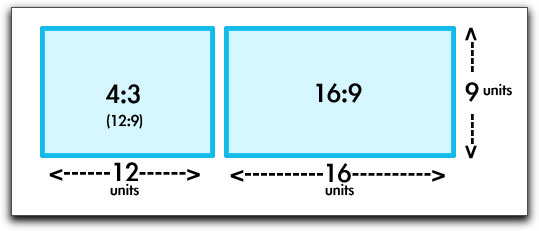
Give your presentation to the chair as a PPT or PDF file, in a 4:3 or 16:9 ratio.

Slide ratios: 4:3 is 12 by 9 units, 16:9 is 16 by 9 units
Both ratios are accepted.

After the session

Certificate and recordings

Presentation certificate

Your certificate is sent to your email address soon after your presentation session.

Find your session

Session times, rooms and Teams links are in the schedule of events.